
How do you auto-number a large list of rows in Excel?

  • Thread starter Thread starter Guest
  • Start date Start date
G

Guest

Without having to type each number from 1 to, say, 300, and hit the down
arrow or enter in between each, isn't there a command in Excel that will
automatically do this for you?
 
Hi light the cells you want to number and 'Edit'...'fill'....'series' (step
value is how much the numbers increase by and stop value is the highest
number.)
 
hi,

if it is continuous, type 1 in a2, 2 in a3, select both cells and click on
the little blac box (right down) and drop dow.

or
=IF(B1<>"",COUNTA($B$1:B1)&".","")

This formula, which is copied down to the other cells in column A, displays
the next consecutive item number if the corresponding cell in column B is not
empty. If the cell in column B is empty, the formula displays nothing.

As items are added or deleted from column B, the numbering updates
automatically.
hth
--
regards from Brazil
Thanks in advance for your feedback.
Marcelo


"Birdieguy" escreveu:
 
You do not have to highlight the cells you want to fill! Enter a 1 in the
cell where you want to start. With this cell selected, hit
<Edit>,<Fill>,<Series>, Select Column, select Linear, select step value of
1, enter stop value of 300, and click on OK
 
Can you explain this: "click on
the little blac box (right down) and drop dow" a little more clearly?

I tried the alternate method (the formula) and couldn't get it to work for me.

Thanks!
 
OK I figured out the first method, but would still like to get the formula to
work. I guess I need to learn more about formulas.

Thank you, Marcelo.
 
True, I've just always found it easier to just hi-lite a big chunk of the
column and then you don't have to selct column, and linear at least from the
default settings. You don't have to hi-lite the exact length of the fill,
just hi-lite more cells than the numbering length.
 
Yep! Thanks Kassie.

kassie said:
You do not have to highlight the cells you want to fill! Enter a 1 in the
cell where you want to start. With this cell selected, hit
<Edit>,<Fill>,<Series>, Select Column, select Linear, select step value of
1, enter stop value of 300, and click on OK
 
If the cells to the right of the column you want to place values is not
empty, you can place a 1 in the first cell, hold ctrl+double click, and wala,
the values fill in until the right cell is empty or a cell in the column is
not blank.
 
I'm looking for a formula that will number my columns 1 - ?? and if i delete
a row, it will automatically fix the numbering in column A
 
OK...Hard to explain.

Column A. I want to number 1- 400 lets say. Then when i have an employee
delete a row because they are removing an item, i want column A to fix it's
numbering.

Example for Column A
1
2
3
4
5
Row 3 gets deleted, it then looks like below
1
2
4
5

can the column automatically fix itself or can the grey column with the
numbers be displayed. This one is hard for me to figure out.
 
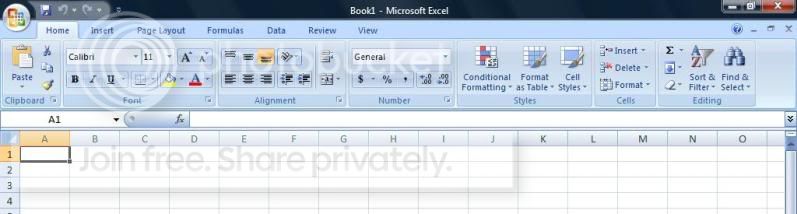
im using this new version of Excel which has no 'edit'. it looks like this:

excel.jpg
 
Sarah

On Home tab go to far right to "Editing" section.

Click on the downarrow icon to see a list of fill options.


Gord Dibben MS Excel MVP

im using this new version of Excel which has no 'edit'. it looks like this:

excel.jpg


tim m said:
Hi light the cells you want to number and 'Edit'...'fill'....'series' (step
value is how much the numbers increase by and stop value is the highest
number.)
 
Birdieguy said:
Without having to type each number from 1 to, say, 300, and hit the down
arrow or enter in between each, isn't there a command in Excel that will
automatically do this for you?
 
sarah said:
im using this new version of Excel which has no 'edit'. it looks like this:

excel.jpg


tim m said:
Hi light the cells you want to number and 'Edit'...'fill'....'series' (step
value is how much the numbers increase by and stop value is the highest
number.)
 
sarah said:
im using this new version of Excel which has no 'edit'. it looks like this:

excel.jpg


tim m said:
Hi light the cells you want to number and 'Edit'...'fill'....'series' (step
value is how much the numbers increase by and stop value is the highest
number.)
 

Ask a Question

Want to reply to this thread or ask your own question?

You'll need to choose a username for the site, which only take a couple of moments. After that, you can post your question and our members will help you out.

Ask a Question

Back
Top